Hotels
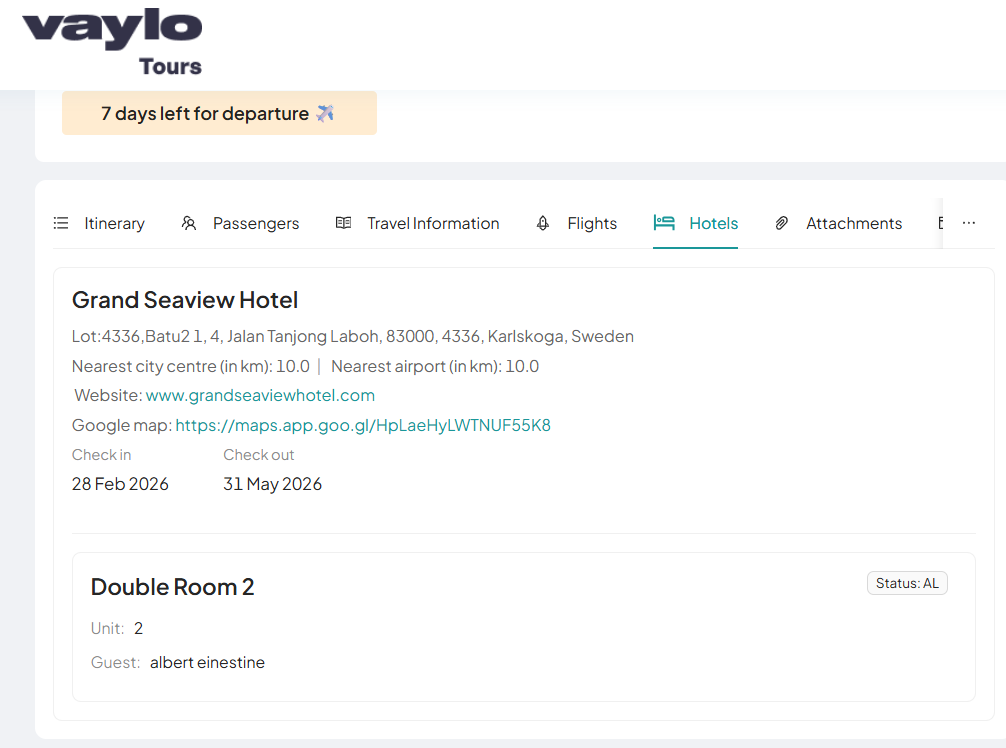
The Hotels section displays accommodation information assigned through the Admin Portal's Booking Itinerary tab. Only hotels that have been assigned to the booking will appear here.
Hotel Information
Hotels assigned in the Admin Portal are automatically reflected in this section. The following hotel details are displayed where available:
| Field | Description |
|---|---|
| Street Address | Physical address of the hotel |
| Postcode | Postal code |
| Location | Area or locality (Required) |
| Country | Country where the hotel is located (Required) |
| Nearest City Centre | Distance to city centre in km |
| Nearest Airport | Distance to nearest airport in km |
| Website | Hotel's official website link |
| Google Map | Google Maps link for the hotel location |
Required Fields
Location and Country are required fields. All other hotel details are displayed only if they have been filled in the Admin Portal.
Room Details
Each assigned room is listed under the hotel with the following information:
| Field | Description |
|---|---|
| Room Type | Type of room assigned (e.g., Double Room) |
| Unit | Number of rooms assigned |
| Guest | Guest(s) linked to this room |
| Status | Current room status (e.g., AL – Allotted) |
No Hotel Assigned
If no hotel has been assigned to the booking in the Admin Portal, this section will remain empty and no hotel information will be displayed.