Hotels Section
Manage all hotel-related information including accommodations, room assignments, and financial data.
Add Hotel (Tour with Attached Hotels)
Hotels associated with the tour are automatically displayed in the hotel list. To add a hotel manually, click the Add Hotel button, where all available hotels for the tour will be shown.
Steps
- Click Add Hotel
- List displays all hotels attached to the tour
- Select hotel(s) to add
- Confirm selection

Selected hotels will appear in the Hotels section.
Manual Hotel Addition
Add hotels not attached to the tour.
Steps
- Click Add Line
- Enter hotel details manually
- Fill required information
- Click Save

Adding Financial Line
Track costs and pricing for hotel accommodations.
Financial Fields
- Locate the hotel entry
- Click Add Financial Line
- Enter details:
| Field | Description | Type |
|---|---|---|
| Quantity | Number of rooms/nights | Input |
| Local Cost | Cost in hotel's currency | Input |
| Currency | Currency code | Select |
| Rate | Exchange rate | Input |
| Unit Cost | Cost per room/night | Calculated |
| Markup (%) | Percentage markup | Input |
| Markup | Markup amount | Calculated |
| Net | Cost + Markup | Calculated |
| VAT (%) | VAT percentage | Input |
| VAT | VAT amount | Calculated |
| Unit Price | Final price per room/night | Calculated |
| Total | Total accommodation cost | Calculated |
- Click Save

Attached Hotel Financials
When selecting a tour-attached hotel:
Pre-configured financial lines display automatically for tour-attached hotels.
You can:
- View default pricing
- Modify if needed
- Add additional costs
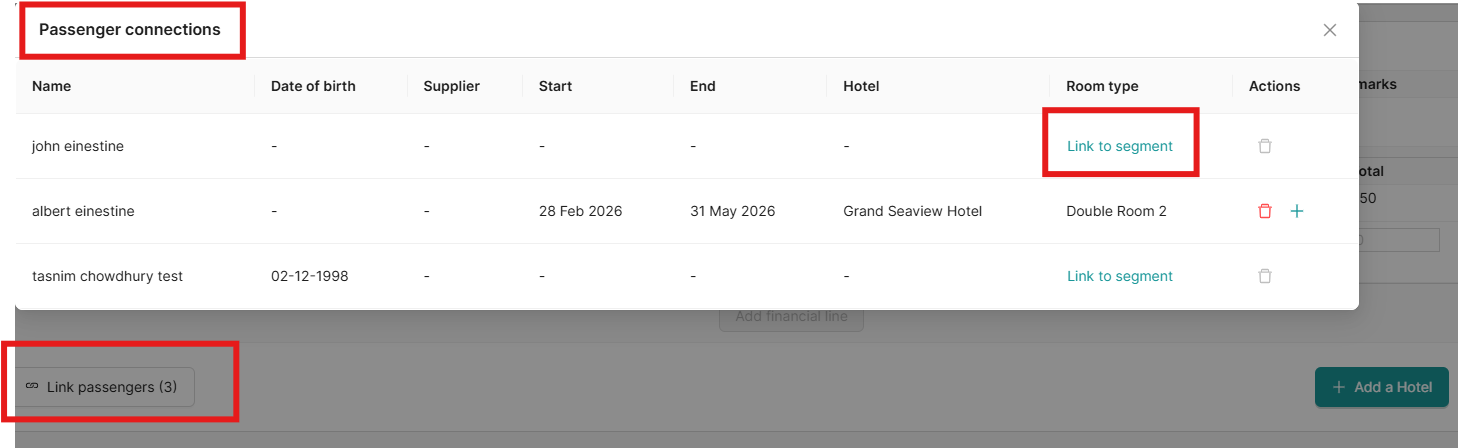
Link Passenger to Hotel
Assign passengers to specific hotel rooms.
Steps
- Click Link Passenger2
- Select passenger(s) for this hotel
- click on link segment
Delete option is also available to remove a hotel linkage.
Benefits
- Track room assignments
- Manage passenger accommodations
- Verify booking requirements
- Simplify check-in process
Best Practices
✅ Link all passengers to hotels
✅ Verify room types match passenger count
✅ Check-in/check-out dates match itinerary
✅ Review hotel financial lines for accuracy
✅ Note special requests in remarks
✅ Confirm room availability before booking