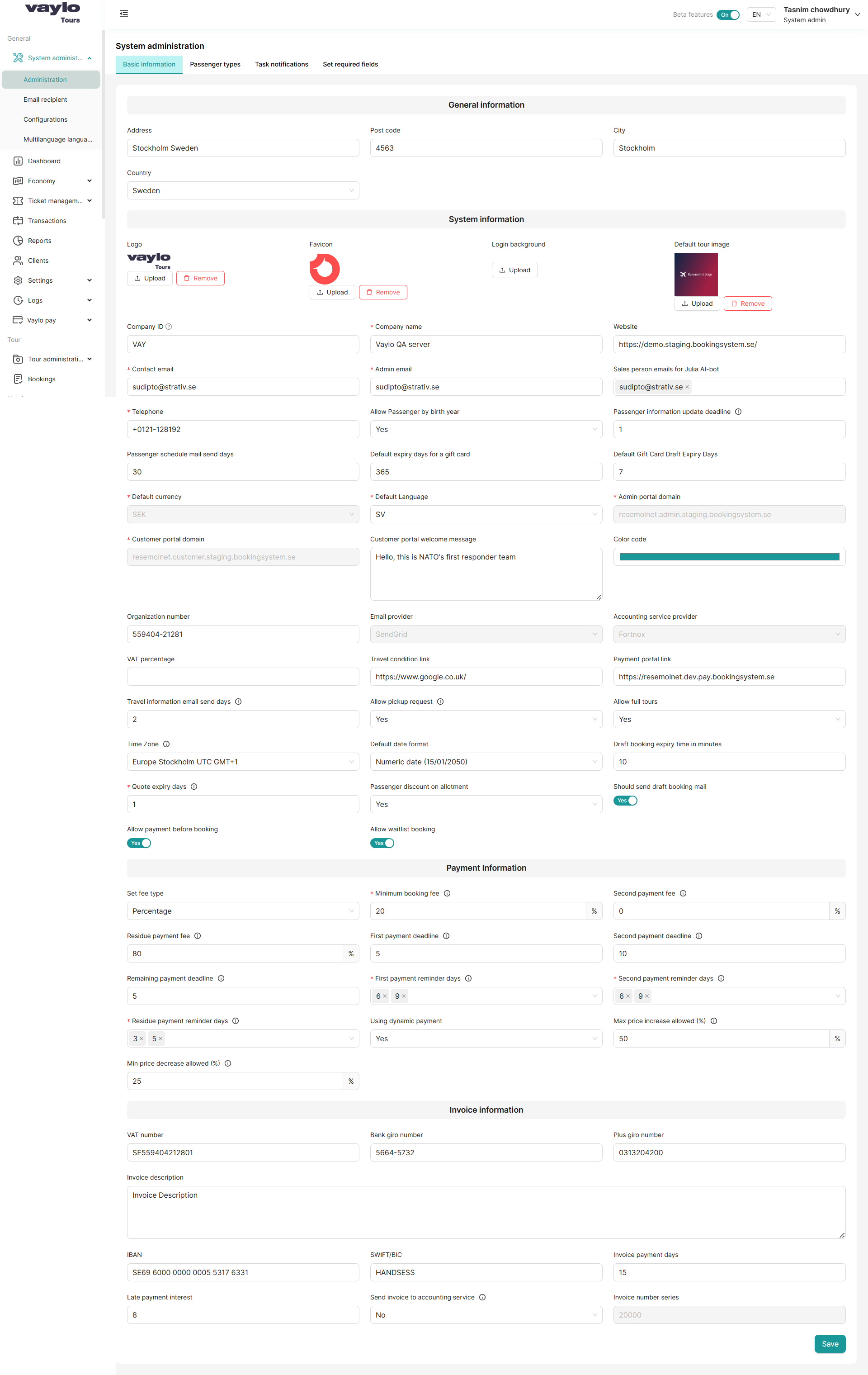
The Basic Information tab contains all core configuration settings for the Vaylo platform.
It is divided into four sections: General Information, System Information, Payment Information,
and Invoice Information.
Navigate to: System Administration → Administration → Basic Information
This section stores the company's physical address details.
| Field | Description | Example |
|---|
| Address | Full street address of the company | Stockholm Sweden |
| Post code | Postal/ZIP code | 4563 |
| City | City where the company is located | Stockholm |
| Country | Country of operation (dropdown) | Sweden |
This section controls the platform's branding, identity, and operational settings.
Branding
| Field | Description |
|---|
| Logo | Company logo displayed in the admin panel. Upload a PNG/SVG image. |
| Favicon | Small icon shown in browser tab. Recommended size: 32×32px. |
| Login background | Background image shown on the login screen. |
| Default tour image | Fallback image used when no image is uploaded for a tour. |
Company Identity
| Field | Required | Description | Example |
|---|
| Company ID | Yes | Unique short code for the company | VAY |
| Company name | Yes | Full name of the company | Vaylo QA server |
| Website | No | Company website URL | https://demo.staging.bookingsystem.se/ |
| Contact email | Yes | Primary contact email | tasnim@strativ.se |
| Admin email | Yes | Email used for admin notifications | tasnim@strativ.se |
| Sales person emails for Julia AI-bot | No | Emails that receive AI-bot sales alerts | tasnim@strativ.se |
| Telephone | No | Company phone number | +0121-128192 |
Passenger Settings
| Field | Description | Example |
|---|
| Allow Passenger by birth year | If Yes, passengers can be added using only their birth year instead of full date | Yes |
| Passenger information update deadline | Number of days before departure after which passengers cannot update their information | 1 |
| Passenger schedule mail send days | How many days before departure the schedule email is sent to passengers | 30 |
Portal Settings
| Field | Description | Example |
|---|
| Admin portal domain | The URL of the admin portal | resemolnet.admin.staging.bookingsystem.se |
| Customer portal domain | The URL of the customer-facing portal | resemolnet.customer.staging.bookingsystem.se |
| Customer portal welcome message | Message shown to customers when they log in to the portal | Hello, this is NATO's first responder team |
Language & Currency
| Field | Description | Example |
|---|
| Default currency | System-wide default currency for all bookings | SEK |
| Default Language | Default language for the platform interface | SV |
Branding & Integrations
| Field | Description | Example |
|---|
| Color code | Primary brand color shown in the platform UI | Teal (#00897B) |
| Organization number | Official business registration number | 559404-21281 |
| Email provider | Third-party email service used for sending emails | SendGrid |
| Accounting service provider | Connected accounting software | Fortnox |
| VAT percentage | Default VAT rate applied to bookings | e.g., 25% |
| Travel condition link | Link to the company's travel terms and conditions page | https://www.google.co.uk/ |
Operational Settings
| Field | Description | Example |
|---|
| Travel information email send days | Days before departure to send travel information email to passengers | 2 |
| Allow pickup request | If Yes, passengers can request a pickup location | Yes |
| Allow full tours | If Yes, tours can be marked as "full" and closed for new bookings | Yes |
| Time Zone | System timezone for scheduling and notifications | Europe/Stockholm UTC GMT+1 |
| Default date format | How dates are displayed throughout the platform | Numeric date (15/01/2050) |
| Draft booking expiry time in minutes | How long a draft booking is held before it expires | 10 |
| Quote expiry days | Number of days a quote is valid before it expires | 1 |
| Passenger discount on allotment | If Yes, allotment passengers receive applicable discounts | Yes |
| Should send draft booking mail | Toggle to enable/disable sending confirmation email for draft bookings | Yes (toggle) |
| Allow payment before booking | If Yes, passengers can pay before the booking is confirmed | Yes (toggle) |
This section defines the payment structure and deadlines for bookings.
Fee Configuration
| Field | Description | Example |
|---|
| Set fee type | How fees are calculated — either as a Percentage or a fixed Amount | Percentage |
| Minimum booking fee | Minimum fee required at the time of booking | 20% |
| Second payment fee | Fee percentage for the second payment installment | 0% |
| Residue payment fee | Fee for the final/residue payment | 80% |
Payment Deadlines
| Field | Description | Example |
|---|
| First payment deadline | The first payment due date is calculated from the booking date based on the configured number of days and can be changed during booking | 5 days |
| Second payment deadline | The date is calculated from the departure date and can be changed during booking | 10 days |
| Remaining payment deadline | The date is calculated from the departure date and can be changed during booking | 5 days |
Payment Reminders
| Field | Description | Example |
|---|
| First payment reminder days | This setting determines the number of days after the booking has been completed when a payment reminder will be automatically sent to the customer. The reminder helps ensure timely payment and can be configured according to the company’s policies | 6 × 9 (multiple reminders) |
| Second payment reminder days | This setting defines the number of days before the due date of the second payment when a payment reminder is automatically sent to the customer. It helps ensure that customers are notified in advance and can make the payment on time. The reminder period can be adjusted according to company policy | 6 × 9 |
| Residue payment reminder days | This setting specifies the number of days before the final payment due date when a payment reminder is automatically sent to the customer. It ensures that customers are notified in advance so they can complete the payment on time. The reminder period can be adjusted according to the company’s policy | 3 × 5 |
Dynamic Pricing
| Field | Description | Example |
|---|
| Using dynamic payment | Enable/disable dynamic pricing rules for bookings | Yes |
| Max price increase allowed (%) | This setting defines the highest percentage by which a tour price provided by a third-party website can be increased dynamically, allowing flexibility in pricing based on demand or other factors | 50% |
| Min price decrease allowed (%) | This setting defines the highest percentage by which a tour price provided by a third-party website can be decreased dynamically, allowing flexibility in pricing based on demand or other factors | 25% |
This section contains the company's banking and invoicing details used in generated invoices.
| Field | Description | Example |
|---|
| VAT number | Company's registered VAT number | SE559404212801 |
| Bank giro number | Swedish bank payment number (Bankgiro) | 5664-5732 |
| Plus giro number | Swedish postal payment number (Plusgiro) | 0313204200 |
| Invoice description | Default text/description shown on all generated invoices | Invoice Description |
| IBAN | International bank account number | SE69 6000 0000 0005 5317 6331 |
| SWIFT/BIC | Bank identifier code for international transfers | HANDSESS |
| Invoice payment days | Number of days the customer has to pay an invoice | 15 |
| Late payment interest | Interest rate (%) charged on overdue invoices | 8% |
| Send invoice to accounting service | If Yes, invoices are automatically sent to the connected accounting service (e.g., Fortnox) | No |
| Invoice number series | Starting number for invoice numbering sequence | 20000 |
Saving Changes
After making changes in any section, click the Save button at the bottom right corner of the page.
⚠️ Note: Incorrect configuration of payment deadlines or fee types can affect booking flows and customer emails. Always double-check before saving.